



Close Menu
phonzio.comphonzio.com

    Subscribe to Updates

    Get the latest creative news from FooBar about art, design and business.

    What's Hot

    Vivo Y05e Teal Unboxing ASMR | Satisfying First Look

    September 7, 2026

    Unboxing the REDMAGIC 11S Pro Nightfreeze Edition | Gaming Beast Unleashed

    September 6, 2026

    When Was Nokia Founded? The Complete History of Nokia

    September 4, 2026
    Facebook X (Twitter) Instagram
    Facebook X (Twitter) Instagram
    phonzio.comphonzio.com
    SUBMIT APP / GAME All Brands
    • HOME
    • PHONES
      • Apple
      • Samsung
      • Google
      • OnePlus
      • VIEW ALL BRANDS
    • Apps
    • Games
    • HOW TO
    • GADGETS
    • TECHNOLOGY
    • REVIEWS
    phonzio.comphonzio.com
    Home » Apps & Games » Adobe Scan AI PDF Scanner, OCR

    Apps

    Adobe Scan AI PDF Scanner, OCR

    App Store Google Play

    SCREENSHOTS

    ×

    DESCRIPTION

    About this app

    right arrow

    The document scanner app in your pocket.

    Adobe Scan is free to download and turns your mobile device into a powerful document scanner app and PDF maker that helps you save and organize your paper documents as digital files.

    6 WAYS TO USE ADOBE SCAN

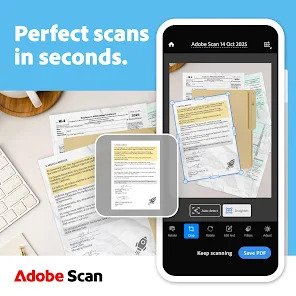
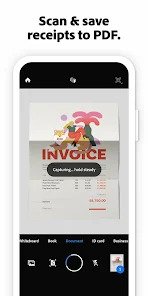
    1) Save time with a fast document scanner app: Use High-speed scan to bulk scan documents and turn stacks into PDFs in seconds.

    2) Make a PDF with your phone: Convert paper documents or printed photos into PDFs or JPEGs with the mobile PDF and photo scanner app.

    3) Ask AI Assistant to pull the key points from any scan, get follow-up answers, or draft emails, reports, and next steps from your scan.

    4) Use Generative summary: One tap pulls the key points from any scan, so you can find what matters and summarize your docs in a tap with AI.

    5) Turn images to text: Use the image-to-text feature to make words in your scans searchable and editable with OCR.

    6) Scan anything: Receipts, IDs, notes, recipes, photos, business cards, whiteboards – this scanner app and PDF maker gives you files you can work with on your phone, tablet, or computer.

    CAPTURE WITH PRECISION
    • The Straighten tool fixes pages that come out curved or tilted while you scan, even if all four corners aren’t visible in the scan.
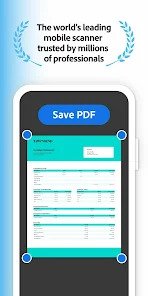
    • Advanced scanner technology detects borders, sharpens content, and makes your scans editable and searchable.

    ENHANCE YOUR SCANS
    • Edit in text lets you scan words and handwritten text to make it editable.
    • Convert photos to PDFs, then use the Modify tool to crop, rotate, resize, and adjust colors in your scans.
    • Reorder pages and preview before saving.
    • Adjust the brightness and contrast of your scans in just a few taps.
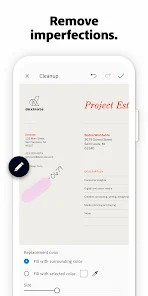
    • Cleanup lets you remove and edit imperfections, erase stains, marks, creases, and even handwriting.

    ORGANIZE YOUR DOCUMENTS
    • Scan paperwork and create custom folders for work documents, personal files, school forms, or ID scans.
    • Contact details are pulled straight from business cards, so you can save them to your phone contacts in seconds.
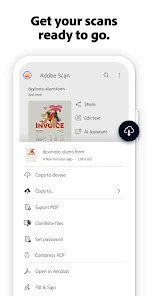
    • Scans are automatically saved to Adobe Document Cloud for instant access and sharing.
    • Set a password to keep that important scan secure while you send it.

    SMART LIBRARY
    • This powerful scanner app finds documents, receipts, and photos in your library and turns them into PDFs.
    • Touch up scans or turn photos into PDFs directly from your camera roll.

    REUSE & SHARE
    • A high-quality PDF maker and scanner that unlocks text from images – from scanned contracts to study notes – so you can copy, edit, and reuse.
    • Export your scans to Word, Excel, or PowerPoint for new formats, then share.

    DO MORE WITH ACROBAT READER
    • Open your PDF scan in Acrobat Reader to comment, highlight, fill forms, and sign documents.
    • Access and share securely across Scan, Reader, and Acrobat on web and mobile.

    IN-APP PURCHASE
    • Subscribe for even more scanning power. Subscriptions work across Scan and Reader mobile apps and Acrobat on the web.
    • Combine scans into one file so you can take multiple scans and consolidate them into one document.
    • Increase OCR capacity from 5 to 100 pages so that you can find text in multiple images.

    Download this free mobile scanner app to convert important photos and documents into PDF and JPEG files to help you stay organized. Adobe Scan is the PDF converter trusted by millions worldwide.

    Terms & Conditions:
    Your use of this application is governed by the Adobe General Terms of Use http://www.adobe.com/go/terms_en and the Adobe Privacy Policy http://www.adobe.com/go/privacy_policy_en.

    Do Not Sell or Share My Personal Information: www.adobe.com/go/ca-rights

    APPS

    Microsoft Teams
    Microsoft Teams
    Truecaller
    Truecaller
    ChatOn – AI Chat Bot Assistant
    ChatOn – AI Chat Bot Assistant
    Golf Strike
    Golf Strike
    Google Gemini
    Google Gemini
    Chess.com
    Chess.com
    Temu
    Temu
    Discord
    Discord
    Sonic Runners Adventure game
    Sonic Runners Adventure game
    CSR 2 Realistic Drag Racing
    CSR 2 Realistic Drag Racing
    Legend Fighter: Mortal Battle
    Legend Fighter: Mortal Battle
    Subway Surfers
    Subway Surfers
    4 ★
    Arrows – Puzzle Escape
    Arrows – Puzzle Escape
    Township
    Township
    Subway Surfers City
    Subway Surfers City
    Gangstar Vegas
    Gangstar Vegas
    InShot
    InShot
    Messenger
    Messenger
    Royal Match
    Royal Match
    CapCut: Photo & Video Editor
    CapCut: Photo & Video Editor
    Microsoft Outlook
    Microsoft Outlook
    Beach Buggy Racing
    Beach Buggy Racing
    Google Maps
    Google Maps
    Idle muRPG – AFK MMORPG
    Idle muRPG – AFK MMORPG
    HBO Max: Stream TV & Movies
    HBO Max: Stream TV & Movies
    4.7 ★
    Google Meet
    Google Meet
    Candy Crush Saga
    Candy Crush Saga
    4.6 ★
    Magic Tiles 3
    Magic Tiles 3
    UC Browser-Safe, Fast, Private
    UC Browser-Safe, Fast, Private
    4.3 ★
    Pizza Ready!
    Pizza Ready!

    RELATED APPS

    Idle muRPG – AFK MMORPG
    Idle muRPG – AFK MMORPG
    SHEIN
    SHEIN
    AliExpress
    AliExpress
    Temu
    Temu
    Amazon Shopping
    Amazon Shopping
    Disney+
    Disney+
    Amazon Prime Video
    Amazon Prime Video
    Netflix
    Netflix

    APPS

    HBO Max: Stream TV & Movies
    HBO Max: Stream TV & Movies
    4.7 ★
    Zoom Workplace
    Zoom Workplace
    Asphalt 8: Airborne
    Asphalt 8: Airborne
    Viber
    Viber
    DeepSeek – AI Assistant
    DeepSeek – AI Assistant
    Microsoft OneDrive
    Microsoft OneDrive
    Egg, Inc.
    Egg, Inc.
    Messenger
    Messenger
    Dungeon Hunter 5: Action RPG
    Dungeon Hunter 5: Action RPG
    Canva
    Canva
    Google Maps
    Google Maps
    ChatGPT
    ChatGPT
    Hay Day
    Hay Day
    X
    X
    Monument Valley 2
    Monument Valley 2
    LinkedIn: Community & Network
    LinkedIn: Community & Network
    Gmail
    Gmail
    BeReal
    BeReal
    Township
    Township
    Asphalt Legends – Racing Game
    Asphalt Legends – Racing Game
    Yahoo Mail
    Yahoo Mail
    Survivor.io
    Survivor.io
    Yalla Ludo – Ludo&Jackaroo
    Yalla Ludo – Ludo&Jackaroo
    CapCut: Photo & Video Editor
    CapCut: Photo & Video Editor
    Family Farm Seaside
    Family Farm Seaside
    Netflix
    Netflix
    AliExpress
    AliExpress
    Google Meet
    Google Meet
    Photoshop Express Photo Editor
    Photoshop Express Photo Editor
    CamScanner- scanner, PDF maker
    CamScanner- scanner, PDF maker
    4.7 ★


    Phonzio is a trusted mobile phone database and review platform designed to help users discover, compare, and choose the best smartphones. We provide detailed specifications, up-to-date information, and honest reviews covering all major brands. From performance and cameras to battery life and pricing, Phonzio makes smartphone research simple and reliable.

    Facebook X (Twitter) Instagram Pinterest
    • Home
    • Get In Touch
    • DISCLAIMER
    • Our Authors
    • Privacy Policy
    © 2026 All Rights Reserved. Designed by DIGIFIMEDIA.

    Type above and press Enter to search. Press Esc to cancel.