
The Samsung Galaxy S25 Ultra is known for its powerful performance, premium display, and long-lasting 5,000mAh battery. However, many users have recently reported that their battery is draining much faster than expected—even with light or moderate use. Some notice significant battery loss overnight, while others experience shorter screen-on time, excessive heating, or rapid battery drops after a software update.
The good news is that a fast-draining battery doesn’t always mean your phone has a hardware problem. In many cases, the issue is caused by background apps, recent One UI updates, battery optimization processes, poor network connectivity, or settings that consume more power than necessary. These problems can often be fixed with a few simple adjustments.
In this guide, we’ll explain the most common reasons why your Samsung Galaxy S25 Ultra battery may be draining quickly, show you how to identify what’s causing the problem, and walk you through proven solutions to improve battery life and get your phone lasting longer again.
Why Is Your Galaxy S25 Ultra Battery Draining So Fast?
Several factors can cause faster-than-normal battery drain on the Galaxy S25 Ultra. In most cases, the issue is software-related and can be resolved without replacing the battery.
Recent One UI or Security Updates
After installing a One UI or security update, your phone may temporarily consume more power while optimizing apps, rebuilding system files, and recalibrating battery usage. Battery life usually improves after a few days of regular use.
Background Apps Running Continuously
Apps like social media, messaging, cloud storage, and email services can continue syncing data in the background, increasing battery consumption even when you’re not actively using them.
Poor 5G or Wi-Fi Signal
If your phone frequently switches between networks or struggles to maintain a stable 5G or Wi-Fi connection, it uses extra power to stay connected, resulting in faster battery drain.
High Display Settings (QHD+ & 120Hz)
The Galaxy S25 Ultra’s large 6.9-inch Dynamic AMOLED 2X display supports QHD+ resolution and a 120Hz adaptive refresh rate. While these features deliver an excellent viewing experience, they also consume more battery, especially at high brightness levels.
Battery Learning After Setup or Update
If you’ve recently set up your phone or installed a major update, the Adaptive Battery system needs time to learn your usage habits. During this learning period, battery performance may seem lower than normal.
Overheating and High Device Temperature
Gaming, 4K or 8K video recording, GPS navigation, charging, or prolonged use in hot environments can increase the phone’s temperature. Excessive heat forces the processor to work harder, which can significantly reduce battery life.
Signs Your Galaxy S25 Ultra Has an Abnormal Battery Drain
It’s normal for battery life to vary depending on usage, but if you notice the following issues regularly, your Galaxy S25 Ultra may be experiencing abnormal battery drain.
Excessive Overnight Battery Loss
If your phone loses more than 10–15% battery overnight while idle, background apps or a software issue could be the cause.
Low Screen-on Time (SOT)
If you’re getting significantly less screen-on time than usual during normal use, it’s a sign that something is consuming power in the background.
Rapid Battery Percentage Drops
A battery that drops several percentage points within minutes of light use may indicate an app, system process, or battery optimization issue.
Phone Gets Hot While Idle
If your Galaxy S25 Ultra becomes warm even when you’re not actively using it, background processes or syncing apps may be causing excessive battery drain.
How to Check What’s Draining Your Battery
Before changing any settings, it’s important to identify what’s using the most power on your Galaxy S25 Ultra. Samsung’s built-in battery tools make it easy to find the cause.
View Battery Usage Statistics
Go to Settings > Battery > Battery Usage to see how much power your phone and installed apps have consumed over the past 24 hours. This helps you identify unusual battery usage.
Identify Power-Hungry Apps
Review the list of apps with the highest battery consumption. If an app is using significantly more power than expected, update it, limit its background activity, or uninstall it if you no longer need it.
Check Background Activity
Open Settings > Battery > Background Usage Limits to see which apps are running in the background. You can place rarely used apps into Sleeping or Deep Sleeping mode to reduce unnecessary battery drain.
10 Proven Ways to Fix Galaxy S25 Ultra Battery Drain
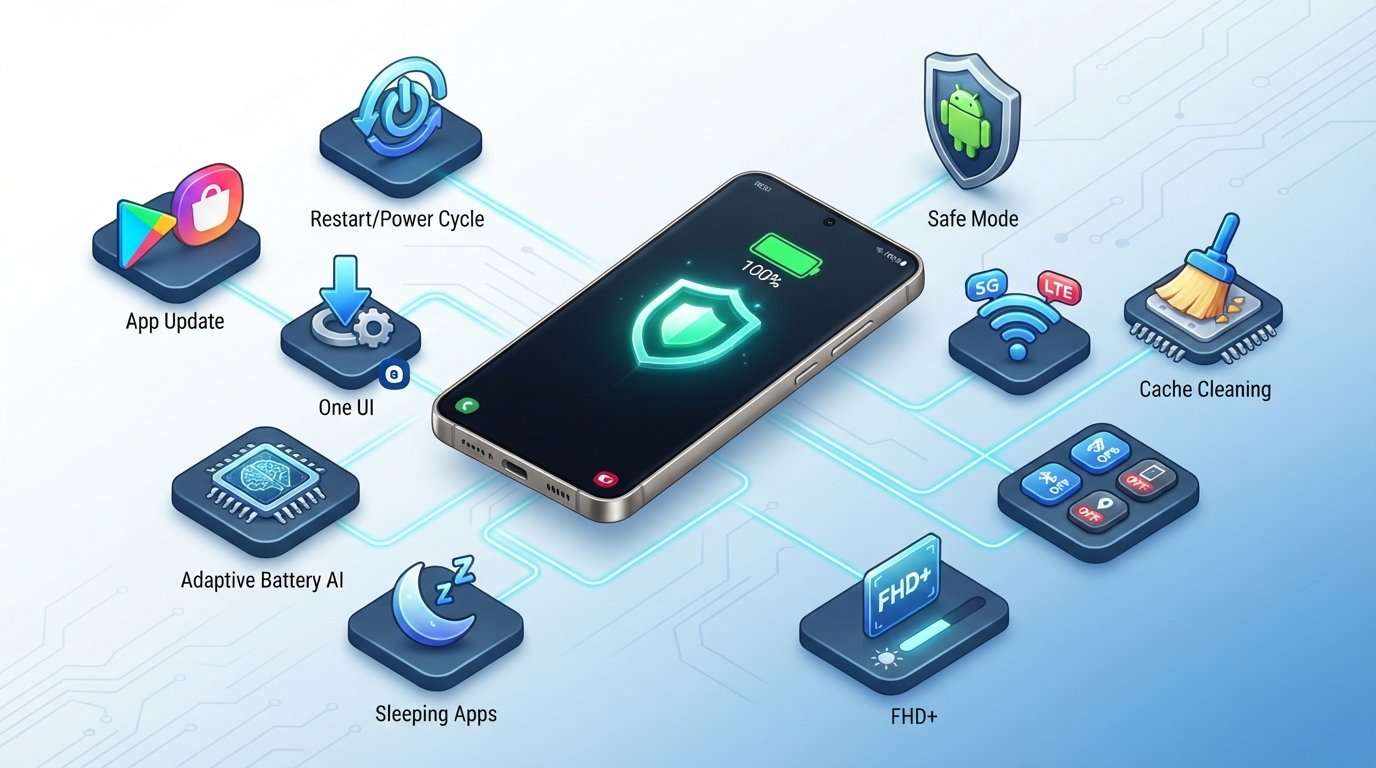
If your Galaxy S25 Ultra battery is draining faster than usual, try these proven fixes. Most users can noticeably improve battery life without performing a factory reset.
1. Restart Your Phone
A simple restart can stop temporary system glitches and background processes that may be causing excessive battery drain.
2. Update Your Apps
Open the Google Play Store and Galaxy Store to install the latest app updates. Developers often release fixes for battery-related bugs.
3. Install the Latest Software Update
Go to Settings > Software Update and install any available updates. Samsung regularly releases security patches and performance improvements that may resolve battery drain issues.
4. Enable Adaptive Battery
Navigate to Settings > Battery > Background Usage Limits and ensure Adaptive Battery is enabled. This feature learns your usage habits and limits power consumption from rarely used apps.
5. Put Unused Apps into Deep Sleep
Move apps you rarely use into Deep Sleeping Apps to prevent them from running in the background and consuming battery.
6. Reduce Display Power Consumption
Lower your screen brightness, enable Adaptive Brightness, use FHD+ resolution if needed, and reduce screen timeout to extend battery life.
7. Turn Off Unused Features
Disable Bluetooth, NFC, GPS, Nearby Device Scanning, and Always-On Display when you don’t need them to reduce unnecessary power usage.
8. Optimize Network Settings
If your area has weak 5G coverage, switch to LTE/4G or use a stable Wi-Fi connection to reduce battery drain caused by constant network searching.
9. Wipe the Cache Partition
After a major One UI update, clearing the system cache can remove temporary files that may affect performance and battery life without deleting your personal data.
10. Boot into Safe Mode
If battery drain continues, start your phone in Safe Mode to determine whether a third-party app is responsible. If the issue disappears, uninstall recently installed or suspicious apps.
How to Improve Battery Life for Everyday Use
A few simple habits can help your Galaxy S25 Ultra last longer throughout the day and reduce unnecessary battery wear over time.
Charge Smartly
Avoid letting the battery drop to 0% regularly or staying plugged in for long periods after reaching 100%. Charging between 20% and 80% can help extend long-term battery health.
Use Battery Protection Features
Enable Battery Protection in Settings > Battery to limit charging and reduce battery aging, especially if you charge your phone overnight.
Limit Background Sync
Disable automatic syncing for apps you don’t use frequently. Reducing background activity helps conserve battery without affecting everyday performance.
Optimize Always-On Display
If you use Always-On Display, set it to Tap to Show or schedule it to appear only during certain hours instead of keeping it on all day.
Manage Location Permissions
Allow location access only for apps that truly need it. Setting apps to While Using the App instead of Always can significantly reduce battery consumption.
When is Battery Drain a Hardware Problem?
Most Galaxy S25 Ultra battery drain issues are caused by software, apps, or settings. However, if the problem continues after trying the recommended fixes, it could indicate a hardware issue.
Signs of a Faulty Battery
If your phone loses battery unusually fast, shuts down unexpectedly, overheats during light use, or takes longer than normal to charge, the battery or another internal component may need inspection.
When to Contact Samsung Support
If battery drain persists after updating your phone, checking battery usage, and booting into Safe Mode, it’s a good idea to contact Samsung Support or visit an authorized service center for a professional diagnosis.
When a Battery Replacement May Be Needed
Battery replacement is rarely necessary on a newer device like the Galaxy S25 Ultra. However, if the battery is physically damaged, swollen, or fails diagnostic tests, replacing it through an authorized Samsung service center is the safest option.
Final Verdict
If your Galaxy S25 Ultra battery is draining faster than expected, don’t assume the battery is defective. In most cases, the issue is related to software updates, background apps, display settings, or network conditions—and it can usually be fixed with a few simple adjustments.
Start by checking your battery usage, updating your apps and software, and optimizing power-saving settings. If the problem continues after trying all the recommended solutions, contact Samsung Support to rule out a hardware issue. With the right settings and regular maintenance, your Galaxy S25 Ultra should deliver the excellent battery life it’s designed to provide.
Frequently Asked Questions (FAQs)
Why is my Galaxy S25 Ultra battery draining so fast?
Fast battery drain is usually caused by background apps, recent One UI updates, high display settings, poor network signal, or excessive background syncing. Checking Battery Usage can help identify the cause.
Does One UI cause battery drain?
After a major One UI update, temporary battery drain is normal while the system optimizes apps and learns your usage patterns. Battery life typically improves within a few days.
How can I improve my Galaxy S25 Ultra battery life?
Keep your apps updated, enable Adaptive Battery, put unused apps into Deep Sleep, reduce screen brightness, disable features you don’t need, and maintain a stable network connection.
Is it normal for battery life to decrease after an update?
Yes. It’s common to experience slightly higher battery usage for the first few days after installing a major software update as your phone completes background optimization.
Should I replace my Galaxy S25 Ultra battery?
Not usually. Since the Galaxy S25 Ultra is a relatively new device, most battery issues are software-related. Consider a battery replacement only if Samsung confirms a hardware problem.
Does 5G use more battery than LTE?
Yes. In areas with weak 5G coverage, your phone may consume more power while searching for or maintaining a 5G connection. Switching to LTE can improve battery life in such conditions.
Can overheating cause battery drain?
Yes. Gaming, video recording, charging, and using your phone in hot environments can increase device temperature, causing the battery to drain more quickly.
Will a factory reset fix battery drain issues?
A factory reset can resolve persistent software-related battery problems if other troubleshooting methods haven’t worked. Be sure to back up your data before resetting your device.
